Skip to content

Operations software for watersports centres

Run the whole centre on one record.

Booking, the front desk, the beach team and the guest’s own phone — four applications sharing one database. For windsurf, wingfoil, kite, surf and dive centres, built through a live season with the people who run one.

  • 1,576

    Guests in one season

  • 333

    Boards tracked individually

  • 2,410

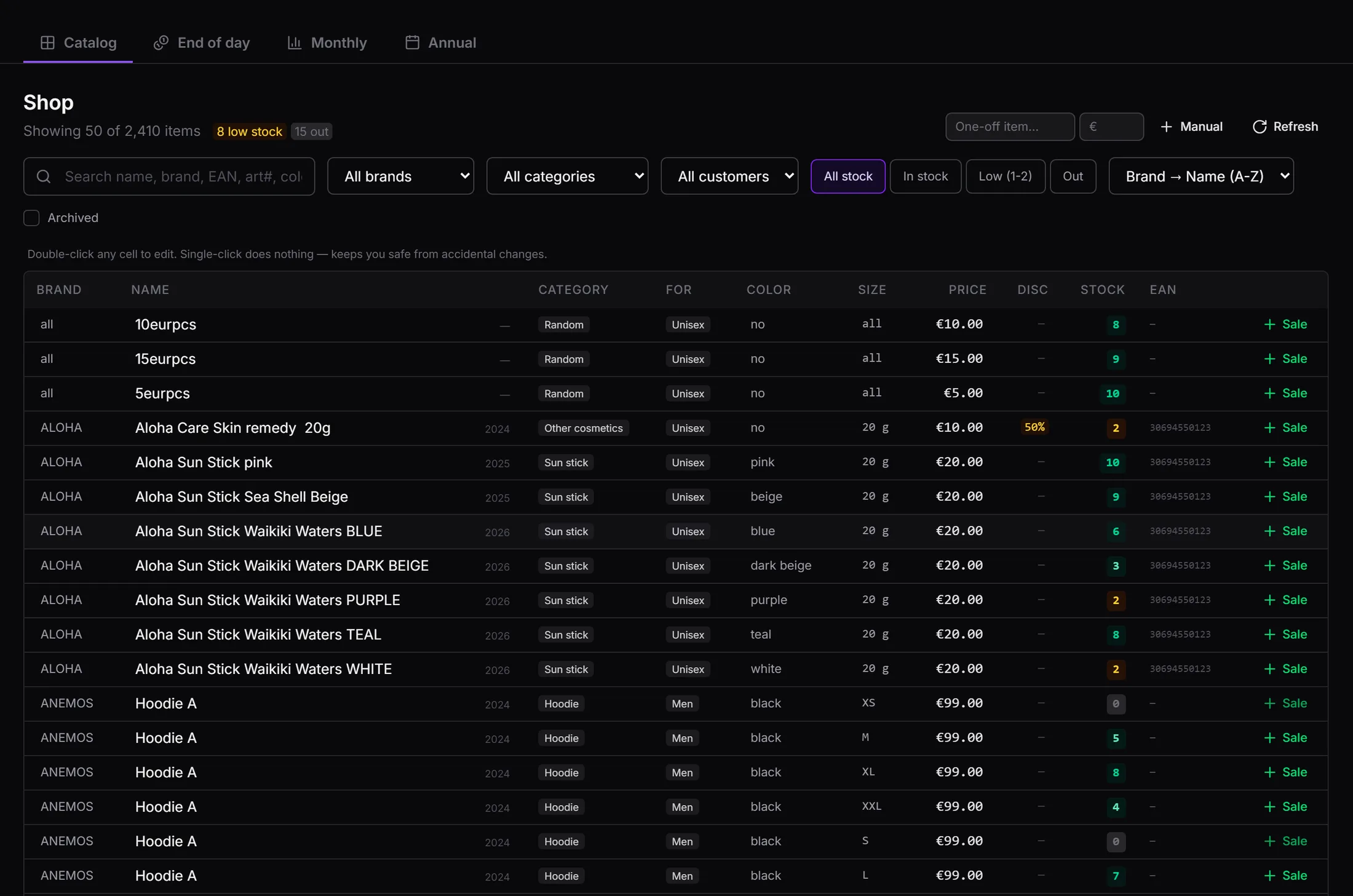
    Shop items catalogued

  • 4

    Applications, one database

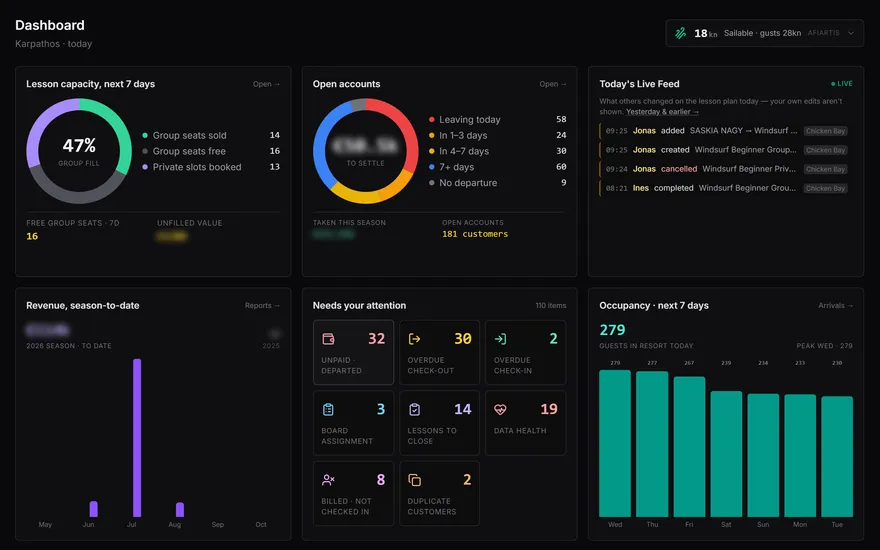
Live figures from one centre’s 2026 season to date — ION Club Karpathos, 11 August 2026.

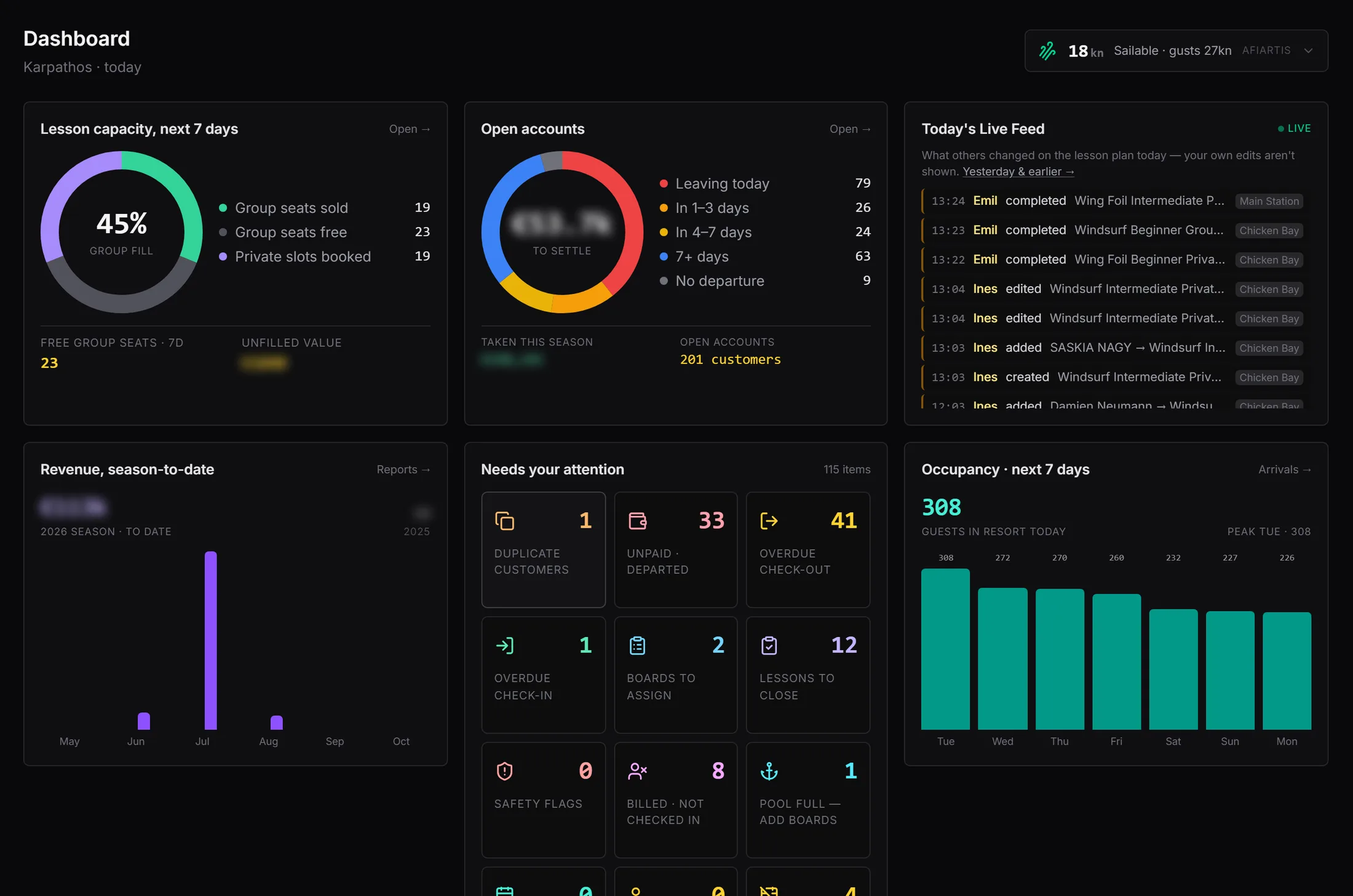
Centre OS · Dashboard
The SurfOps dashboard showing lesson capacity, open accounts, the live feed, revenue, the attention list and occupancy
One screen opens the day: group fill for the week ahead with the euro value of the seats still unsold, so the week’s upsell is a number rather than a feeling; what is owed and who is leaving with it; guests in resort today and the seven-day curve; live wind for the bay; and the shortlist of items that need a person today.

What a centre usually runs

Five systems that do not know about each other

A booking platform the centre does not own. A spreadsheet for the board fleet. A paper lesson book. A chat group on somebody’s personal phone. A till that knows nothing about any of it. Every guest is typed in more than once, and the season’s real numbers only appear in October.

Replacing that has traditionally meant a licence paid up front, an implementation project billed by the day, and a change request every time the operation moves.

What SurfOps is instead

One record, from the booking that lands weeks before the holiday to the settled bill on departure morning.

  • Every guest exists once, however they reached the centre.
  • Every charge is written automatically, attributed and auditable.
  • Every lesson closed on the sand writes the guest’s progress as it happens.
  • The system checks its own records and hands each exception to a person as a worklist.

The platform

Four applications, one database

A centre serves four audiences in four places: the open web, the office, the beach and the guest’s pocket. Each surface is built for its moment — and because they share one database, there is nothing to synchronise and nothing to reconcile.

Windtribe

The booking engine

In design

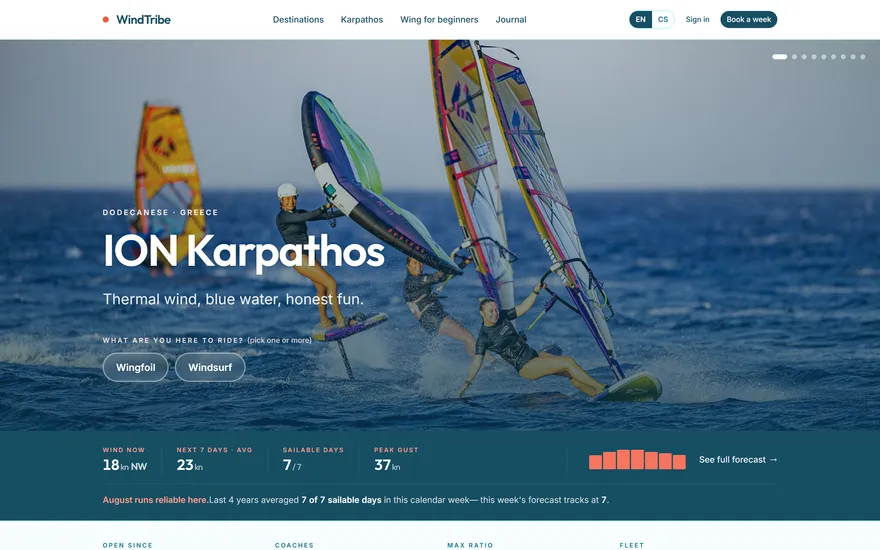
Guests find and book the centre directly — centre and hotel listings, and an order that arrives as an operational record rather than a line on someone else’s platform report. The intake pipeline it uses is already proven in production by the existing platform integration.

Centre OS

Operations and logistics

Live today

The desk and back office: arrivals, the board fleet, storage, lesson planning, the till, the bill, pricing, staff, reports and compliance. This is the system of record the other three write into.

TeamOps

The team app

Live today

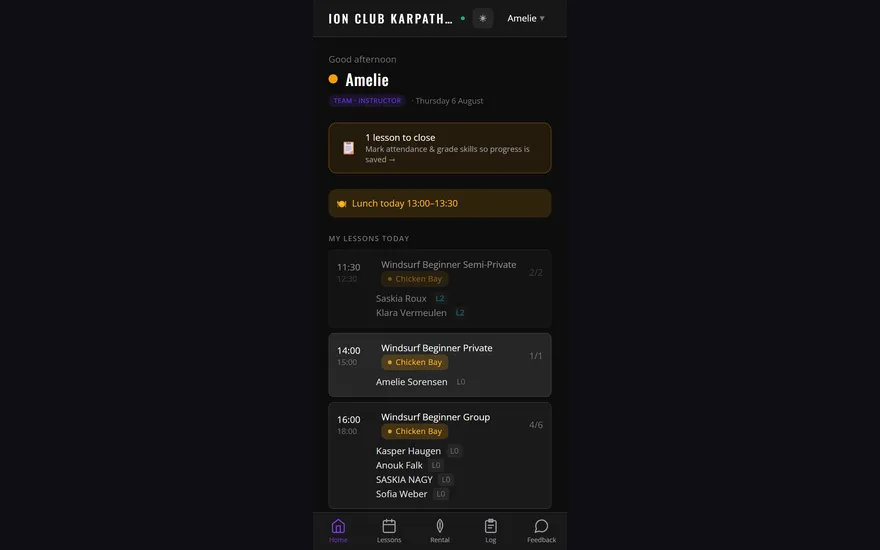
Instructors and beach staff on their own phones. PIN sign-in, built for sunlight and wet hands, and offline-first so a weak signal at the far station delays nothing. Lessons, attendance, progress, rental hours and the team’s own feed.

Guest app

The customer app

Partly live

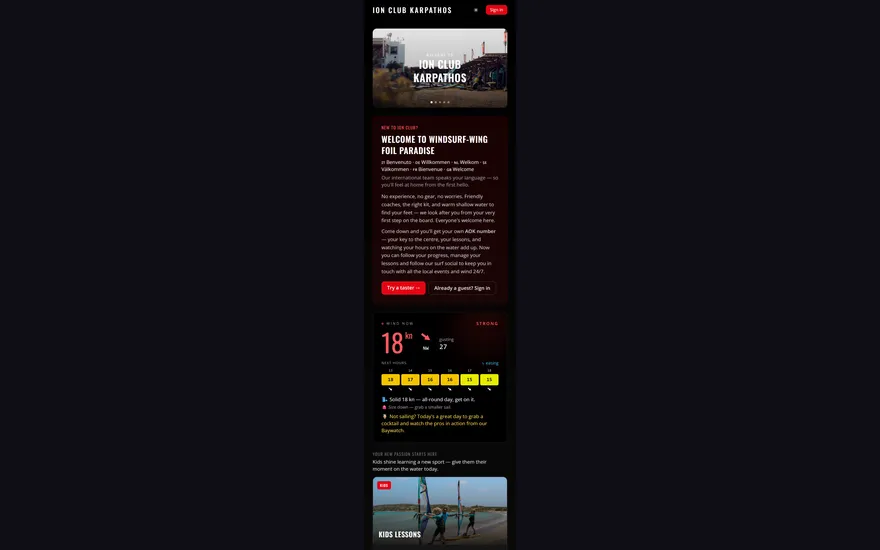
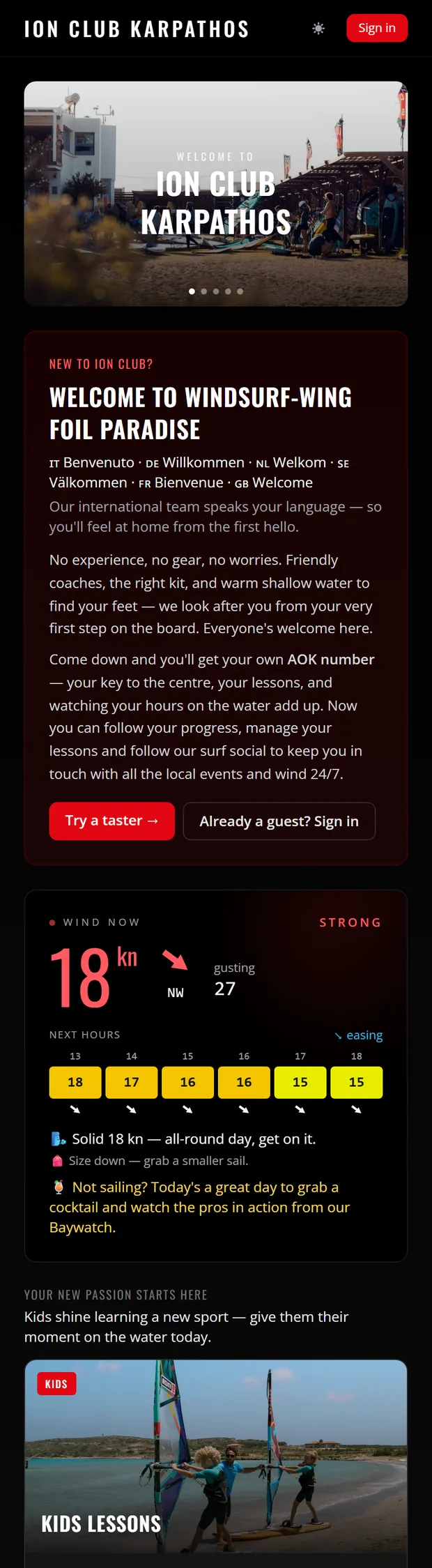
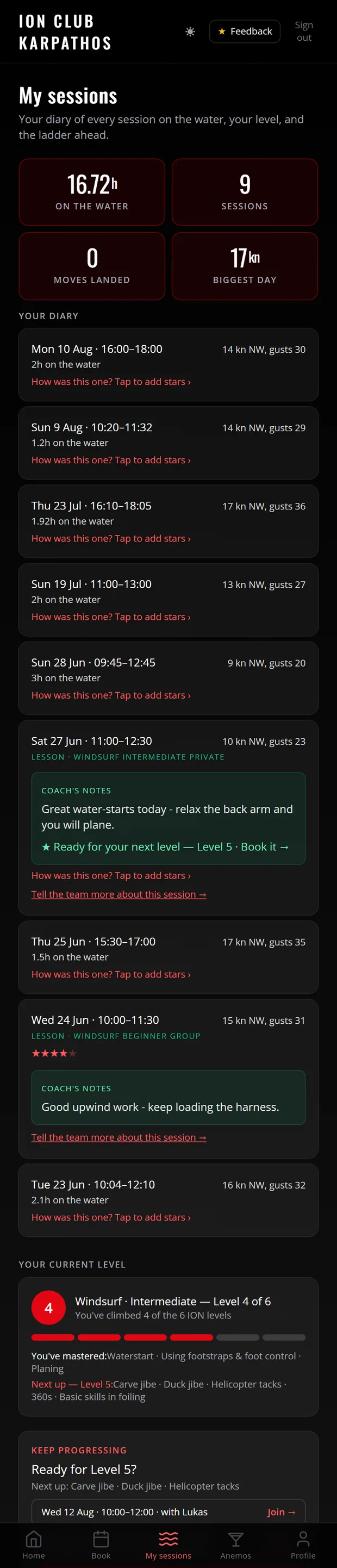
The guest’s own phone: conditions, what is on today, booking a taster without an account, and — since August 2026 — their own diary of every session, hour and level. It carries the centre’s identity, not a marketplace’s.

Where something is planned rather than shipped, this page says so. The screenshots throughout are the production system as it runs today.

Centre OS

The operations and logistics core

Arrivals, kit, people, hours, money and the record that proves it — the working system behind a centre that serves hundreds of guests a week and settles every one of them.

Arrival day

The week already exists before the family lands

A family books a week through the platform — two windsurf rentals, a beginner course, equipment storage, an airport transfer. That order becomes operational records with no re-typing at the centre: named guests, a board with their name on it, a storage slot held, and course hours prepaid and waiting to be scheduled. Arrival day is service, not data entry.

One queue, whatever route they took

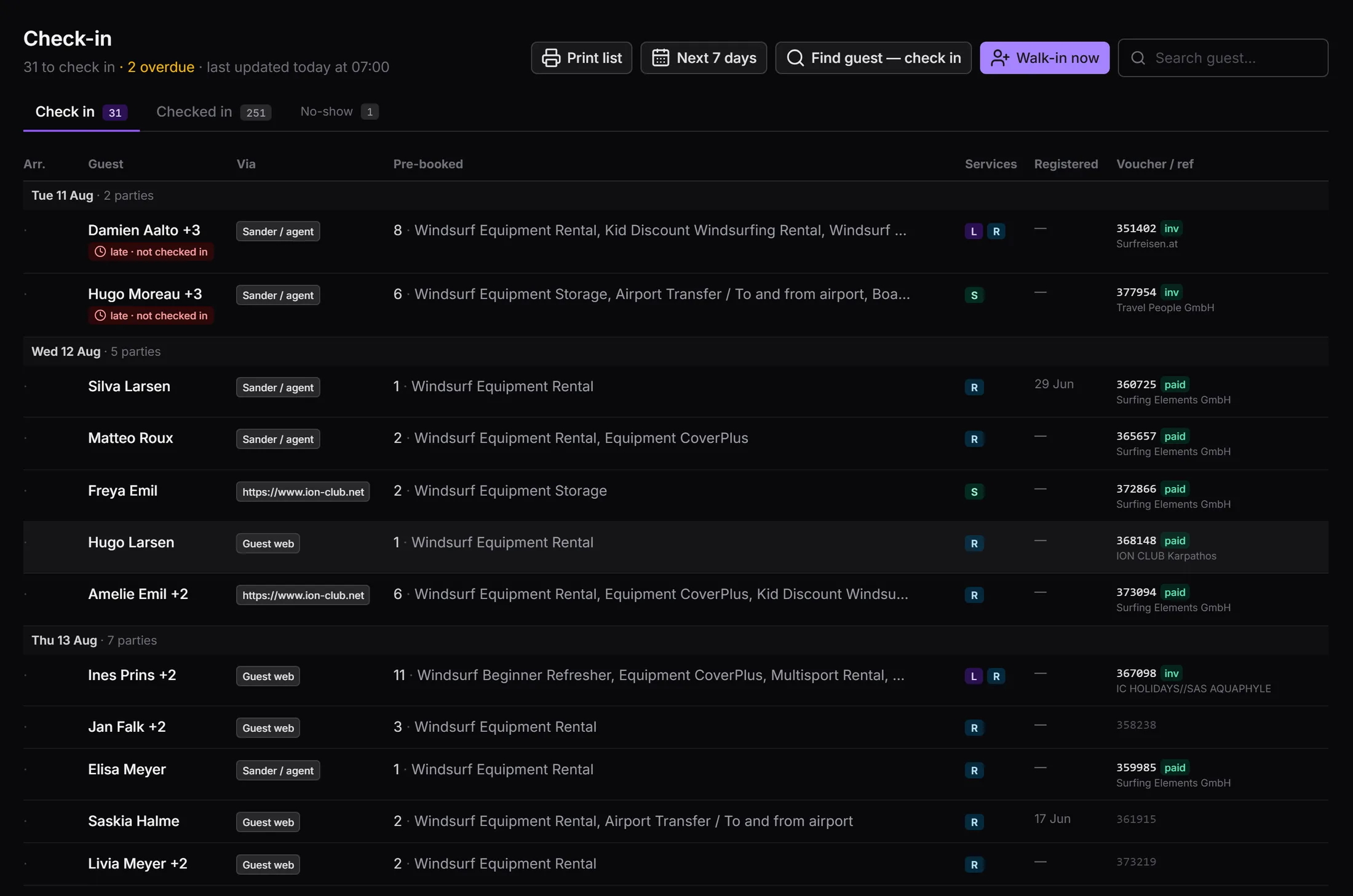
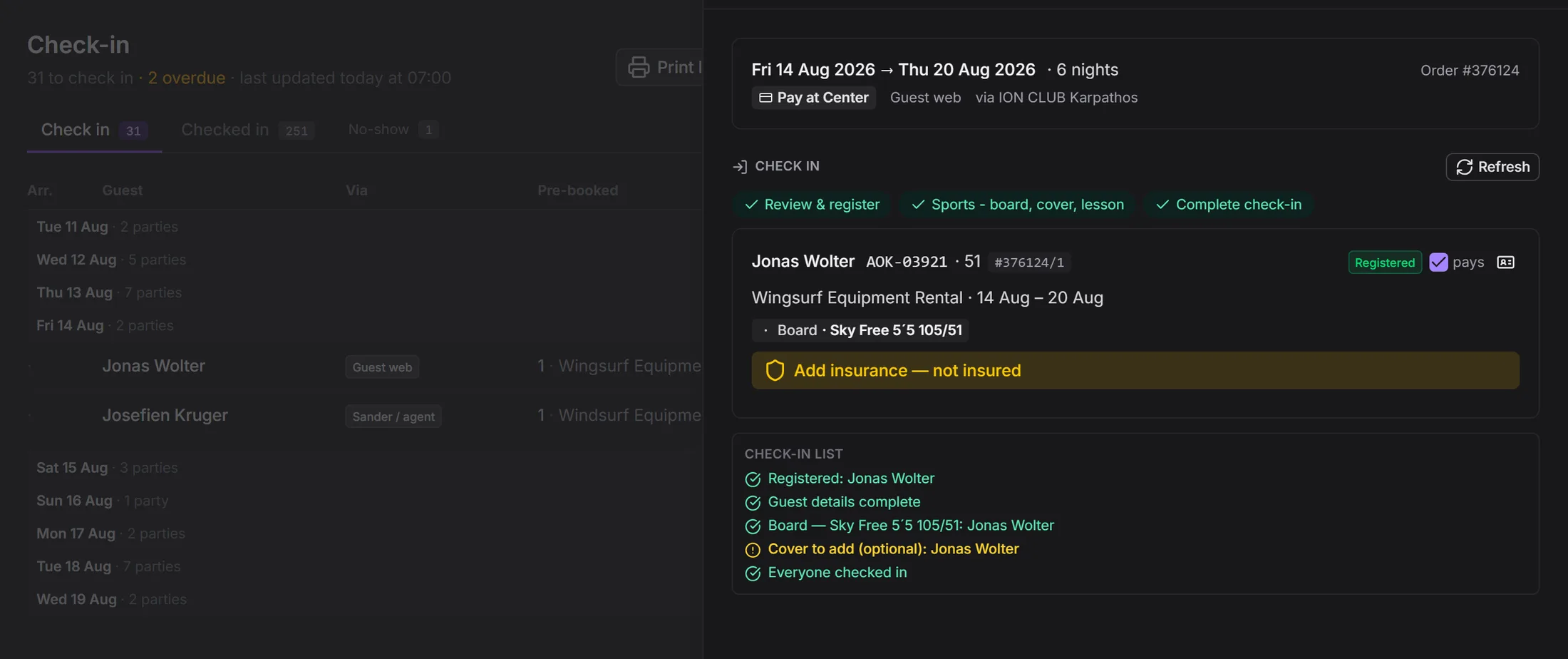
Platform bookings, agent bookings, guest-web orders and self-registered walk-ins land in one list seven days ahead, each row carrying its channel, its pre-booked services and its registration status. Cancelled platform orders clear themselves out, so the list is always today’s work rather than history to scroll past.

One guided pass, one press

The desk handles allocation, registration, insurance and lesson placement with the guest standing in front of them. One press then opens the stay and activates every pre-booked line — the rental package with its dates, the prepaid lesson hours, the storage slot — which the beach team sees immediately in TeamOps. That press goes through even when something is outstanding: what is missing is named per guest and stays flagged on the party’s row, so a tired family is never held at the desk by an open detail.

Registration is a contact the centre owns

Every adult taking part registers on their own phone from a QR code — their details, their emergency contact and their liability acceptance. The email and mobile they enter becomes their guest-app sign-in: a consented contact on the centre’s own list, rather than a name held on somebody else’s platform.

The fleet

Every board is an asset with a season-long history

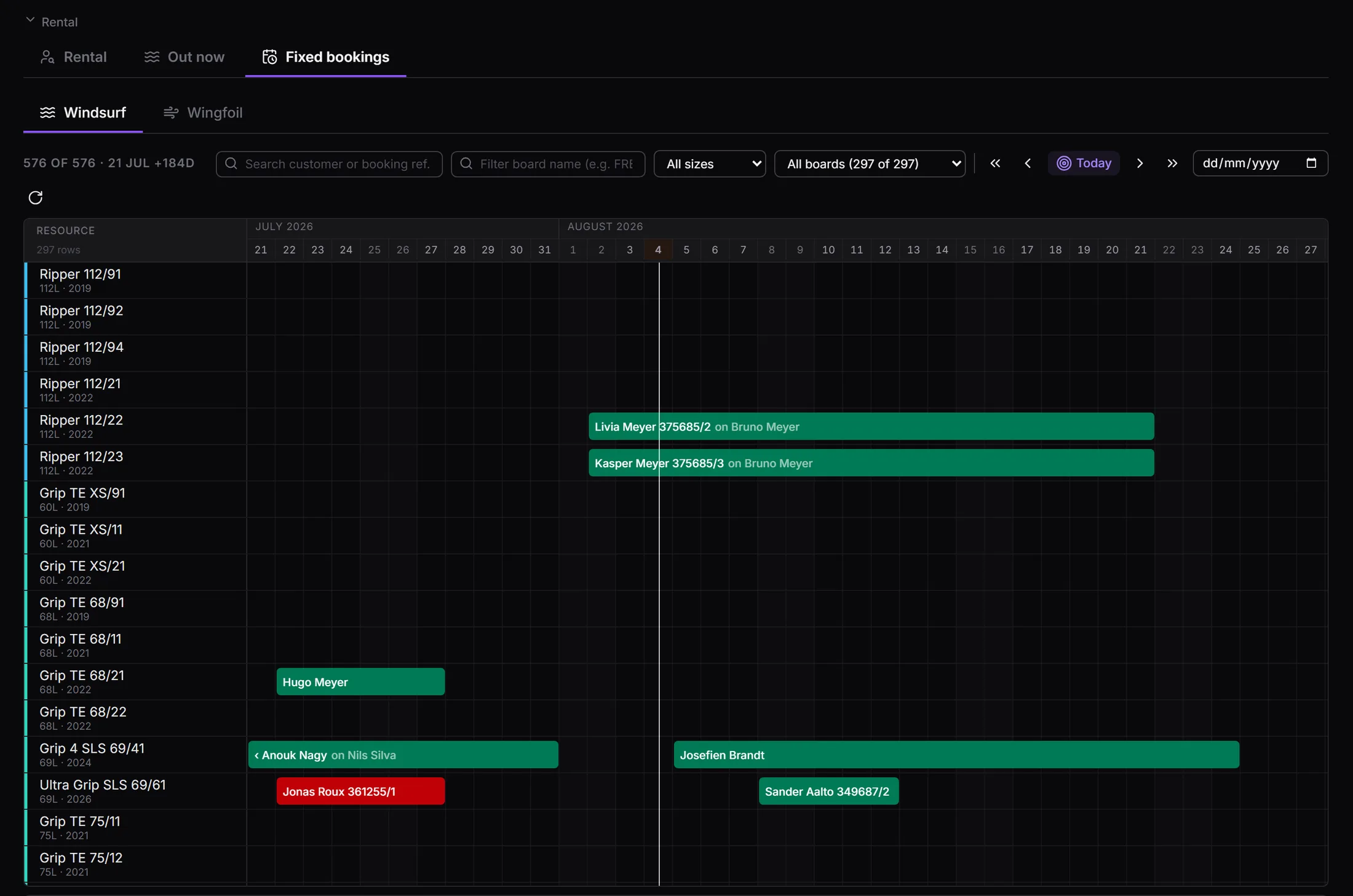
Each board is one serial-numbered object with a model, volume, year and quality grade, laid out on a single calendar. Boards are pre-allocated automatically when bookings sync, and a guest who paid for a specific model is never quietly moved to a substitute.

Centre OS · Boards
The fixed-board calendar, one row per board and one bar per booking across the season
One row per board, one bar per booking, grouped by board family so work is only ever moved between genuinely interchangeable kit.

Lessons

Prepaid hours become scheduled sessions in seconds

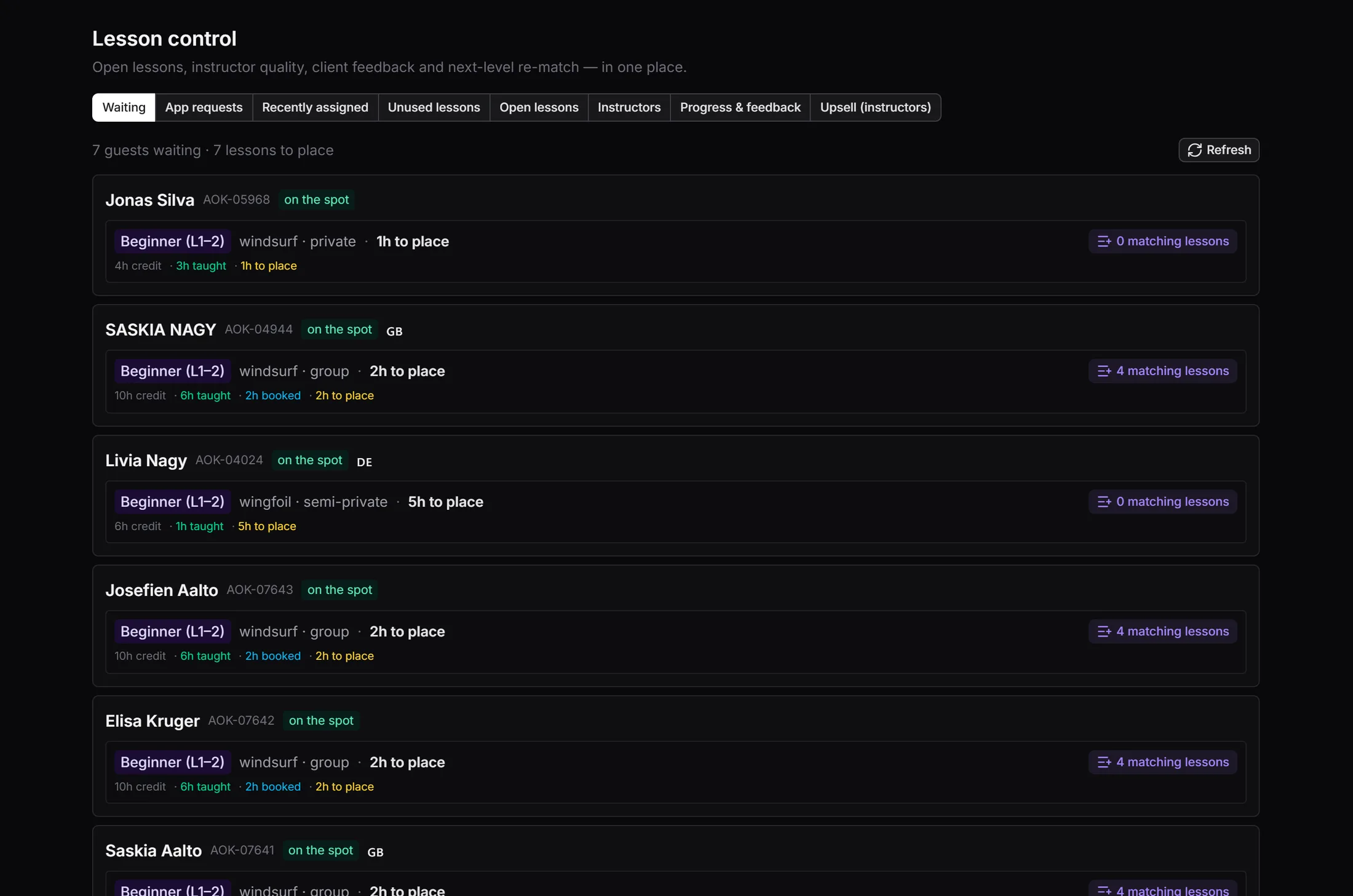
A course arrives as prepaid hours. Turning them into sessions is a judgement about wind, language, ability and group mix — so the screen ranks every waiting guest against the calendar by exactly those things, and shows the euro value of the seats still unsold.

Centre OS · Lesson control
Lesson control, listing waiting guests with prepaid hours and matching lessons
Waiting guests with hours to place, ranked by language, skill overlap, level and soonest start — alongside the tabs for open lessons, unused capacity and guests ready to progress.

Safety, live

Who is on the water, and for how long

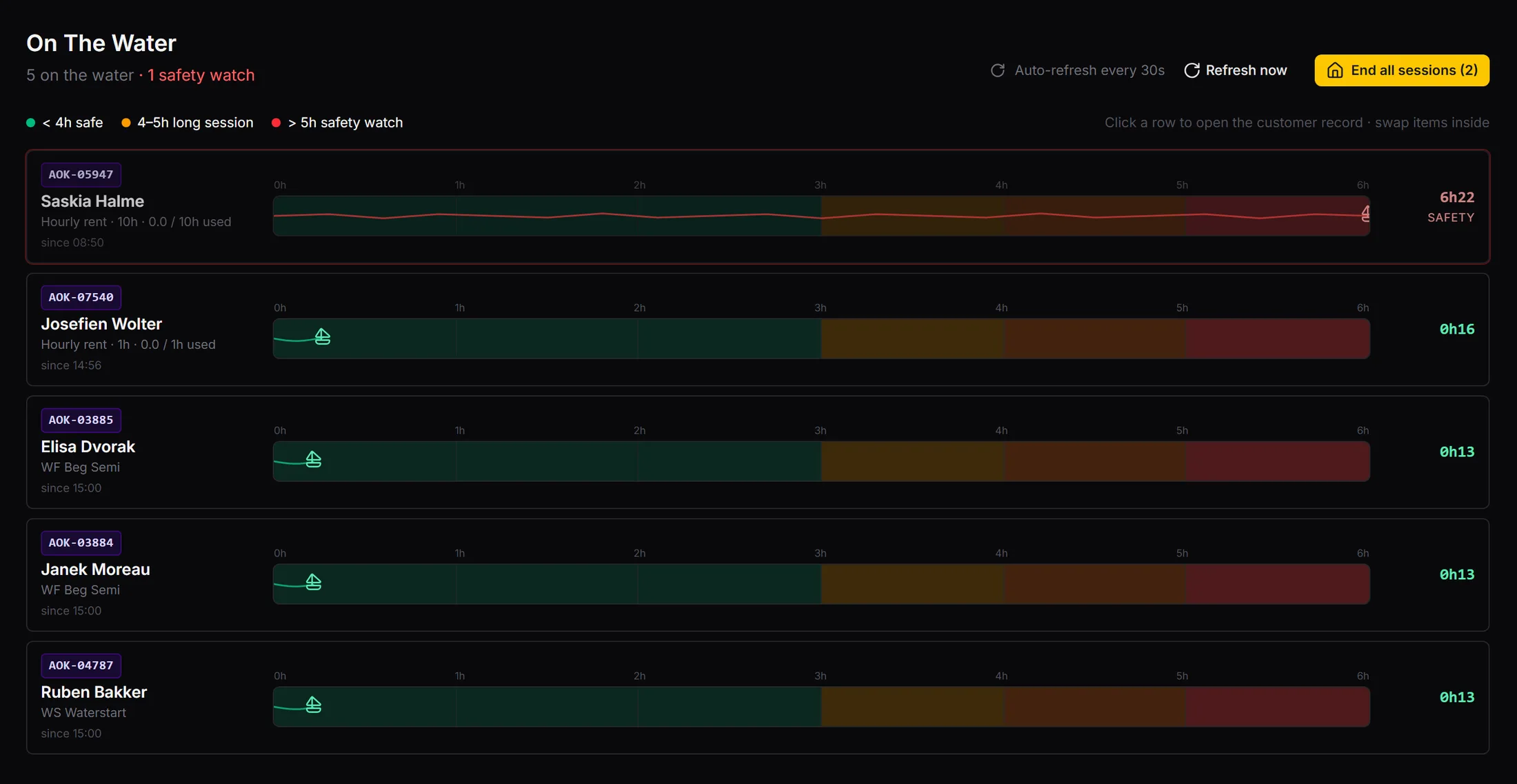
Rentals out, lessons in progress and open hourly sessions combine into one timeline, longest-out first, refreshing every thirty seconds and colour-banded by time out. At close of day, one action brings the whole operation home — every open rental returned and billed, every session closed, every exception named.

Centre OS · On the water
The On the water screen, showing each guest currently out with a time-banded timeline
Green under four hours, amber for a long session, red past five. The same watch list appears on the duty manager’s dashboard.

The money

The bill writes itself, and the season reconciles

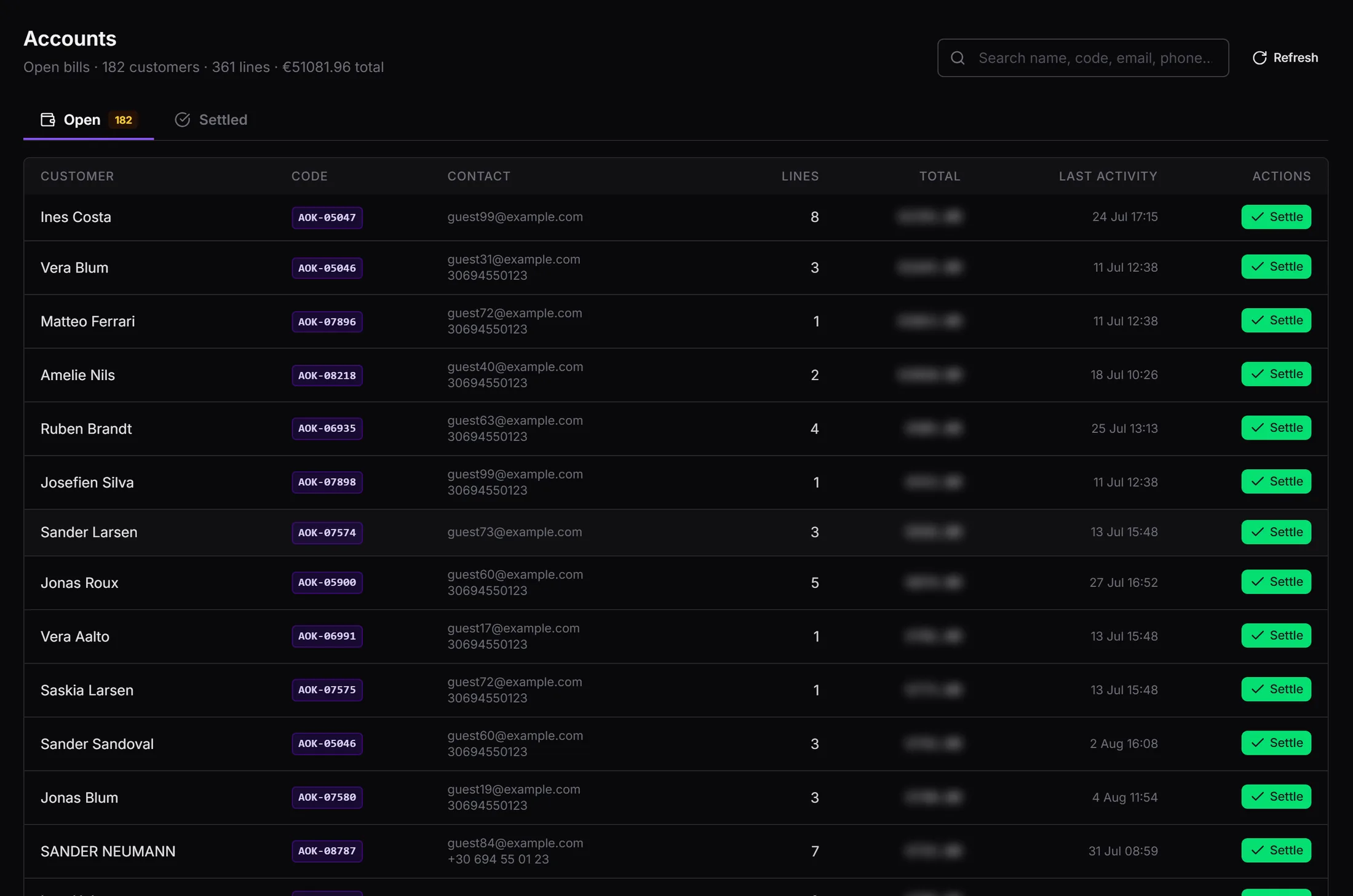
Nobody types a bill. A lesson joined, a rental sold, a storage slot, a shop sale, insurance, a surcharge — each writes one labelled line against the guest who incurred it, the moment it happens. Families roll up to one payer while every member keeps their own lines, and prices snapshot at the moment of sale so last season’s invoice always verifies.

Centre OS · Accounts
The Accounts screen listing every open bill with line counts and totals
Every open bill with its settled history alongside. The dashboard headline and this detail read the same figures, so they cannot disagree. (Totals hidden for this page.)

The numbers

Takings that reconcile, prices the centre controls

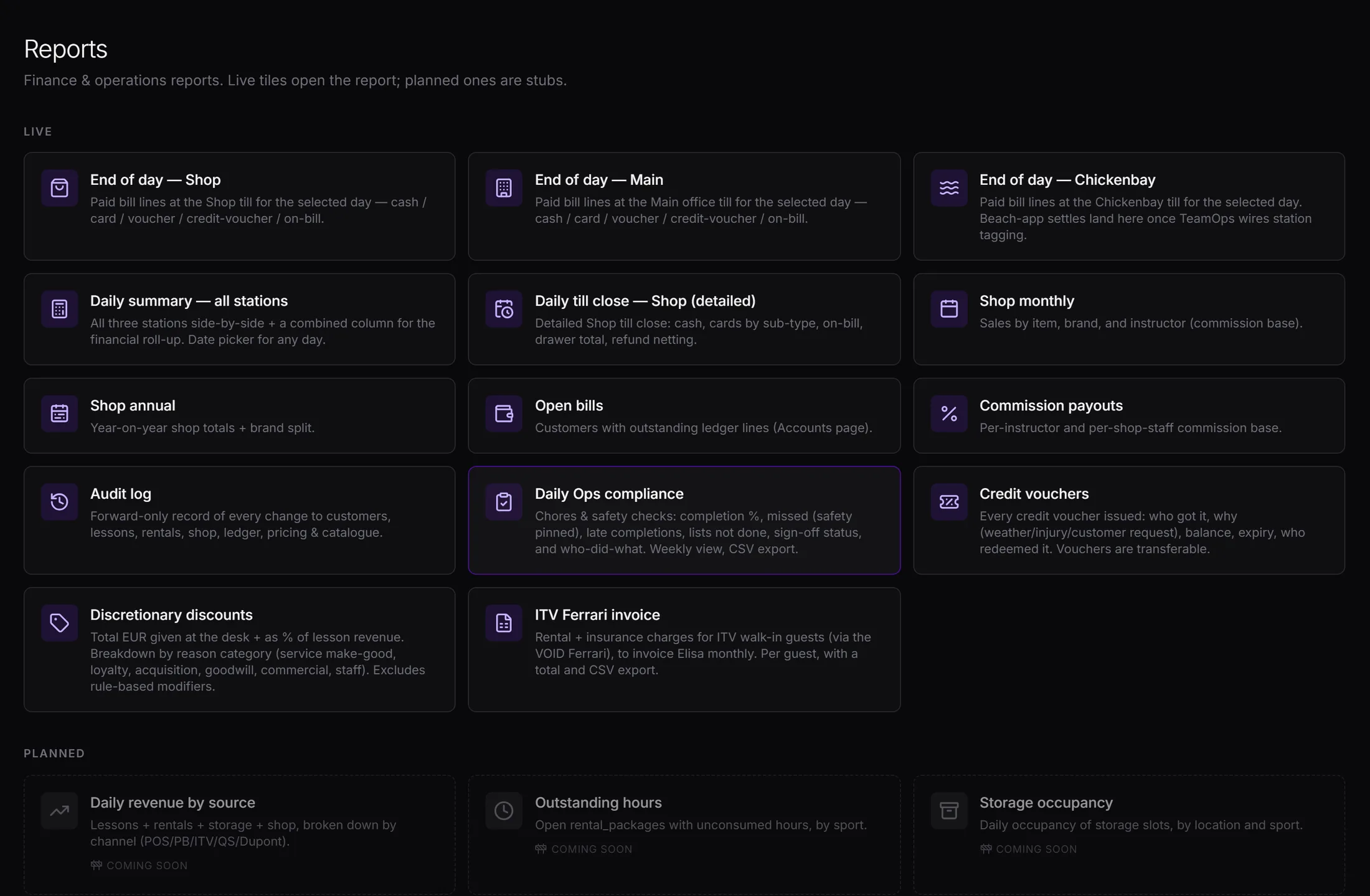
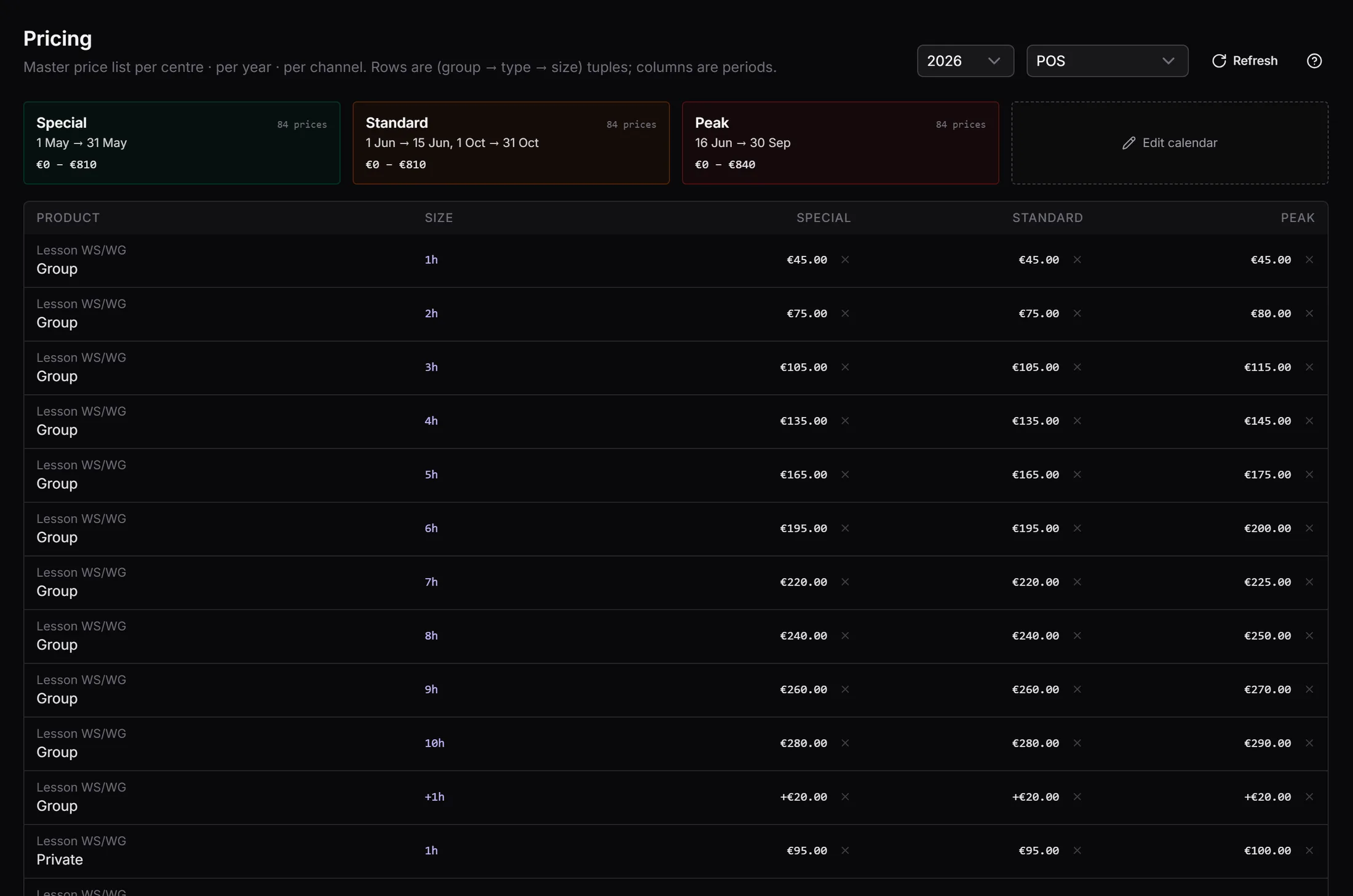
End of day, monthly and annual takings with cash, card, split, on-account and voucher each counted in its own column, and instructor commission computed from the lessons actually taught — so the operational calendar and the payroll figure cannot disagree. Prices are the centre manager’s own: product, channel, season band and size, edited on screen and effective immediately across every till and sale.

Centre OS · Reports
The reports screen with end-of-day, monthly and annual takings
Every payment channel in its own column. (Figures hidden for this page.)
Centre OS · Pricing
The pricing screen listing price rows by product, channel, season and size
436 price rows for the centre and the year, maintained without a developer.

TeamOps

The beach team, on the same records as the desk

Everything a centre knows about a guest is created twice: once at the desk, and once on the water by the instructor who taught them. TeamOps is the second half — and it is what turns a week’s holiday into a coaching relationship.

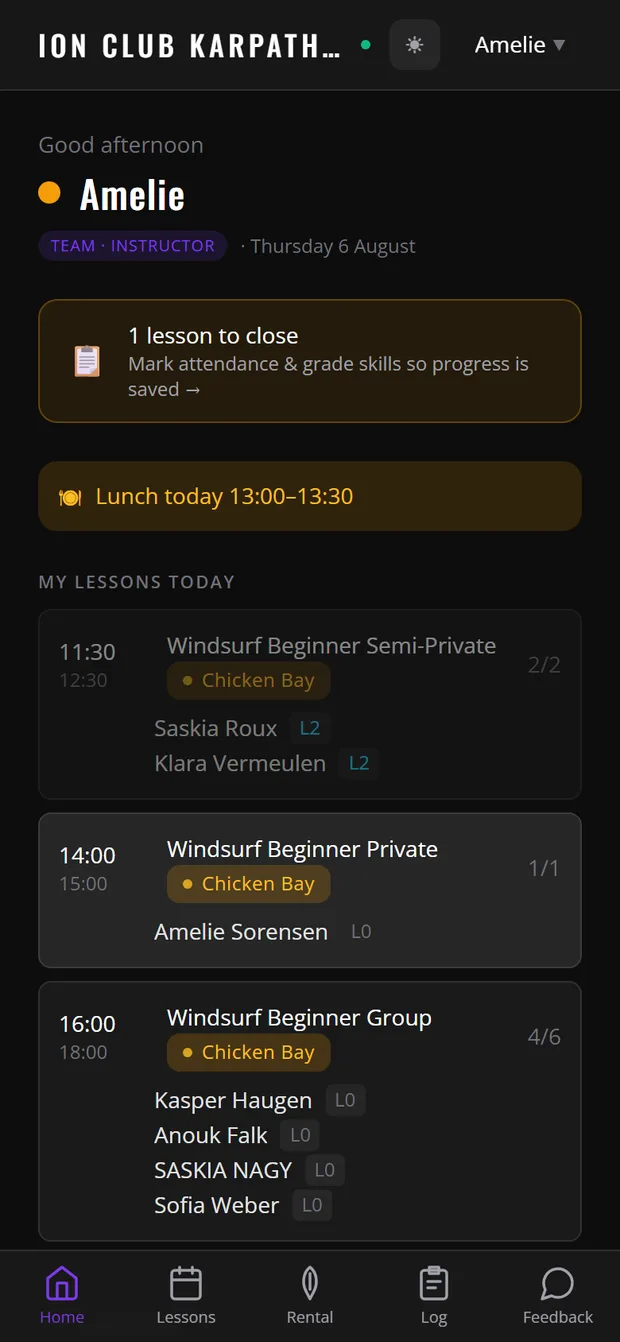
The TeamOps home screen showing live wind, the day’s lessons and station placement
The day already assembled at sign-in: live wind with a plain-language read of which spot suits which level, every lesson with its station and capacity, each guest’s current level on the card, and what is still to close.
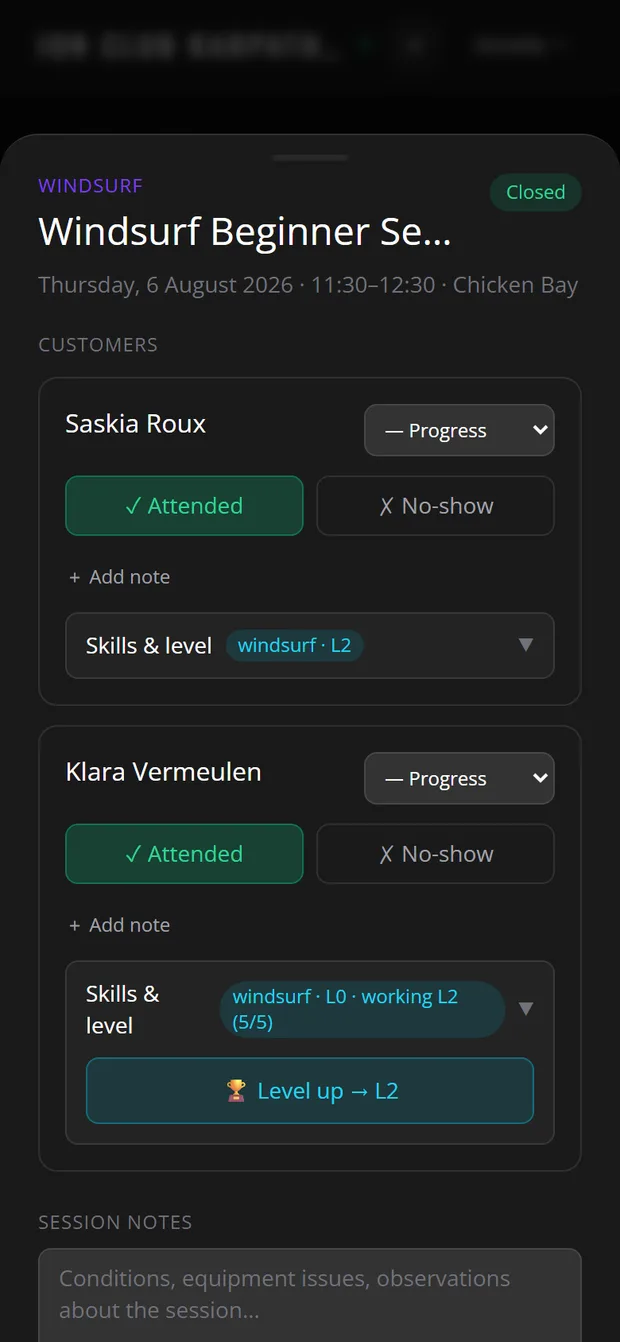
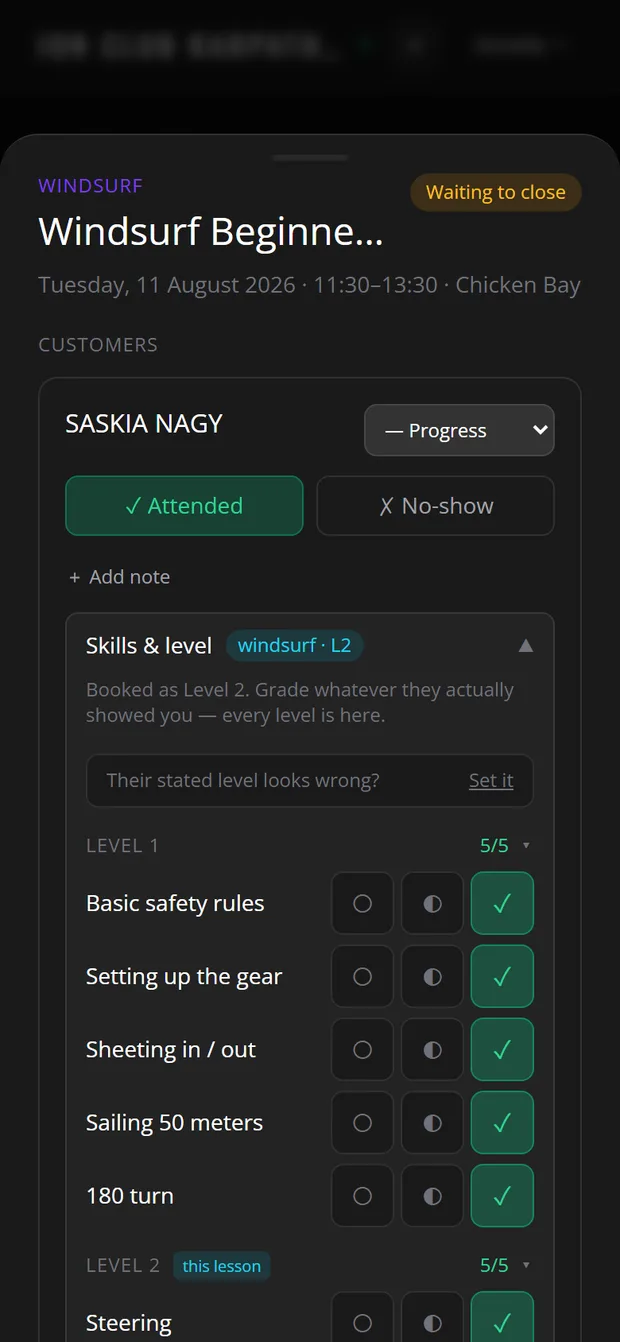
Closing a lesson in TeamOps, grading skills and awarding a level
Closing the lesson: attendance, a progress read, and the manoeuvres for that level ticked off — which moves the guest up the ladder.
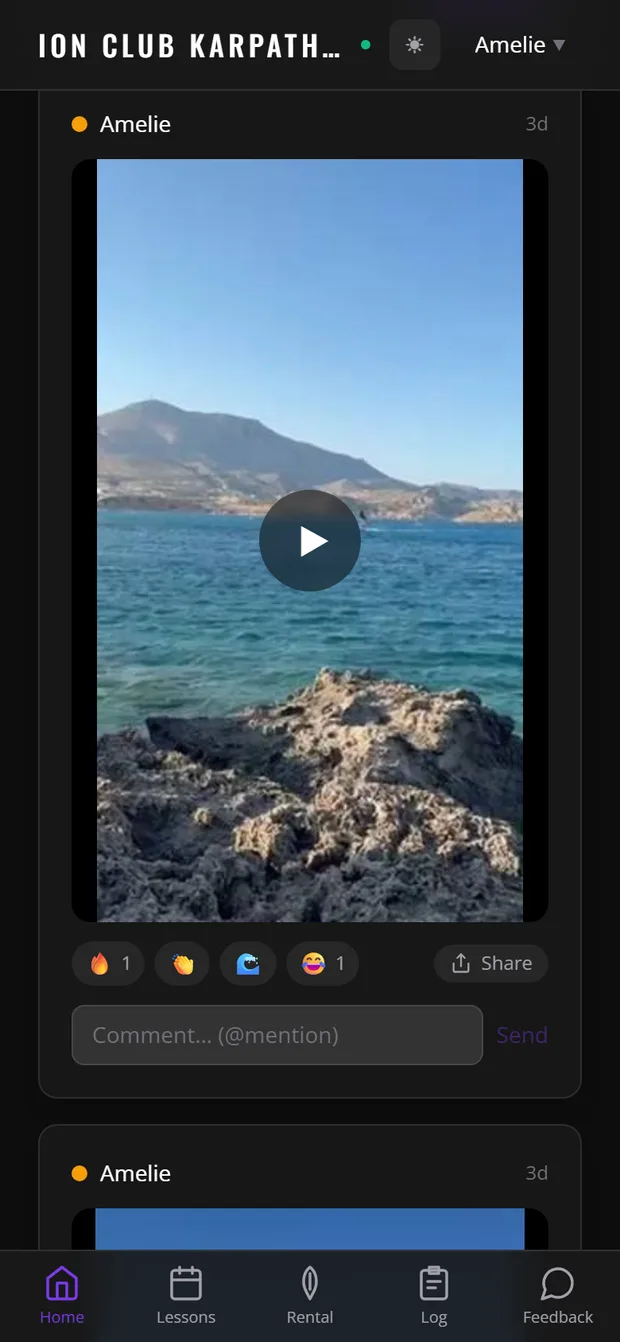
The TeamOps team feed with photos, clips and operational events
The team feed replaces the group chat the centre neither owns nor can search. One press hands the day’s best ride to the phone’s own share sheet, so it reaches the guest who is in it minutes after it happened.
TeamOps · The planner
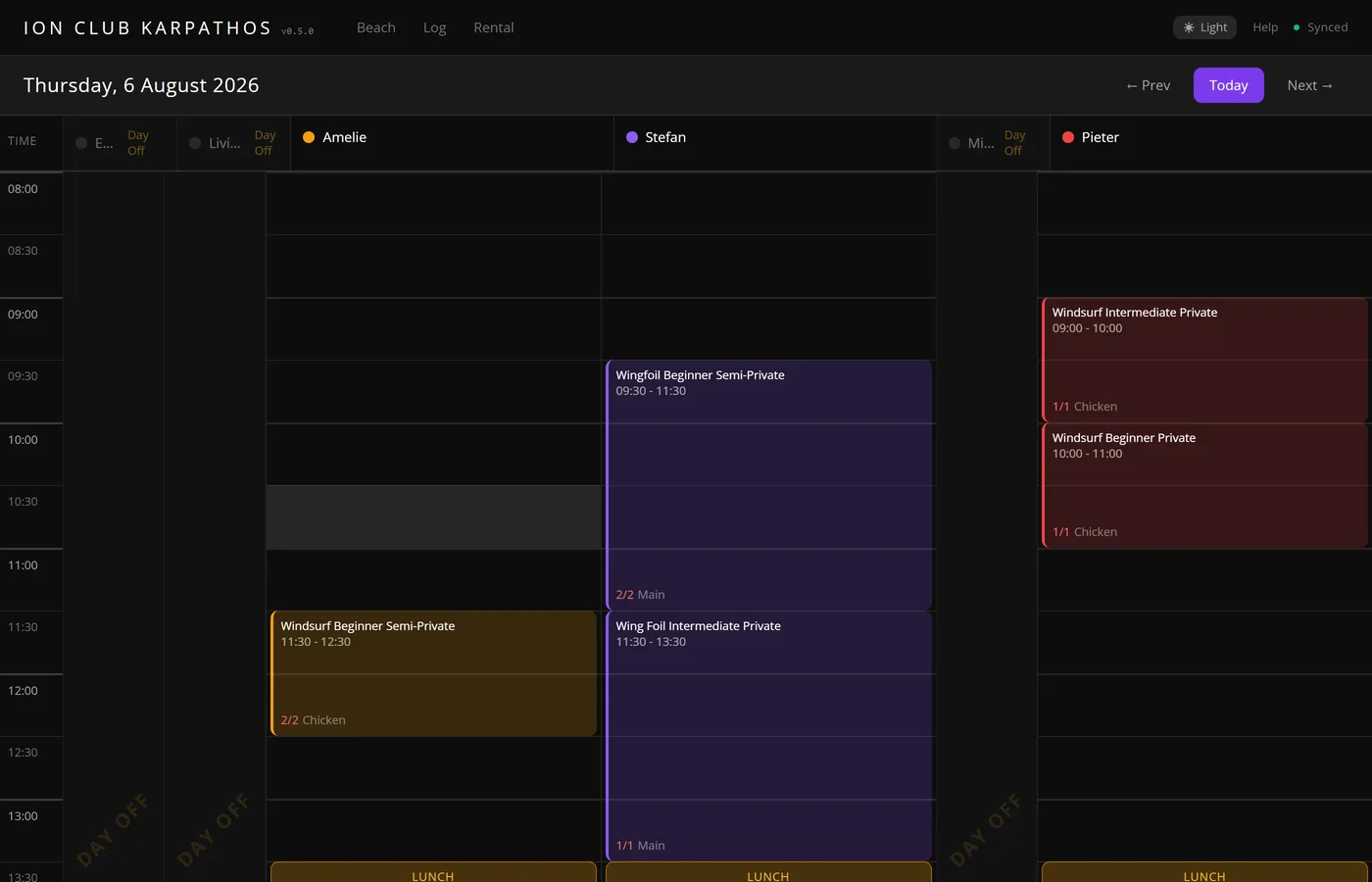
The TeamOps planner showing every instructor’s day side by side
Every instructor across the day, with capacity and station on each lesson and lunch blocks in line. A lesson is dragged to a different hour or a different person, and the instructor who picks it up sees it on their own phone.

What it takes out of the operation

The paper lesson book, the whiteboard, the daily photograph of the whiteboard in a group chat, and the end-of-week transcription of all three into a spreadsheet. The record is captured once, by the person who was there, at the moment it happened.

A season’s worth of team knowledge stays with the centre instead of leaving with a personal phone number. And guests rate six things separately — instruction, equipment, service, the spot, conditions and travel — so a guest who loved the coaching but struggled with the kit is telling the centre exactly what to fix. It arrives the same day, while they are still in resort and something can still be done about it.

The guest app

The centre in the guest’s pocket

A guest arrives for a week and leaves with an app that keeps them connected to the sport, the conditions and the people. It carries the centre’s identity, and everything in it comes from the same records the desk and the beach are working in.

The guest app home screen with live wind and the day’s conditions
Live conditions and a plain-language read of them, on the guest’s phone before they leave the hotel.
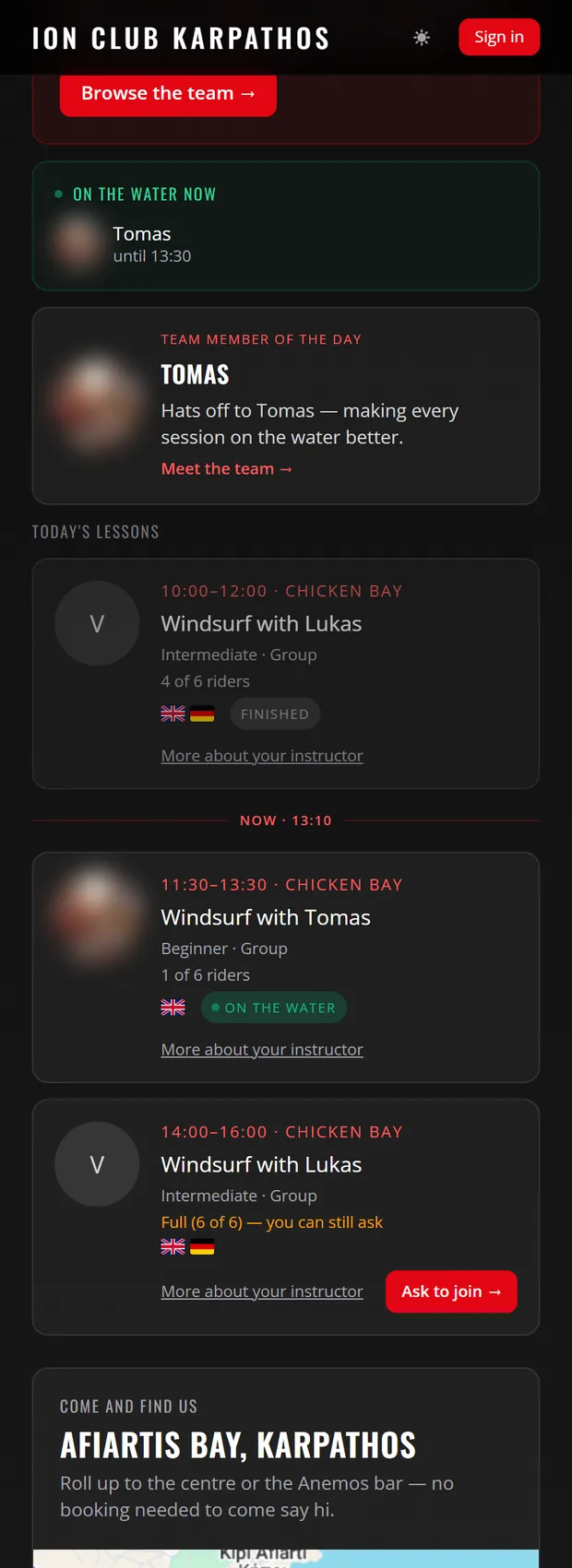
Today’s lessons in the guest app, showing who is on the water now
What is on today, who is teaching it, how many seats are left — and an ask-to-join on the full ones.
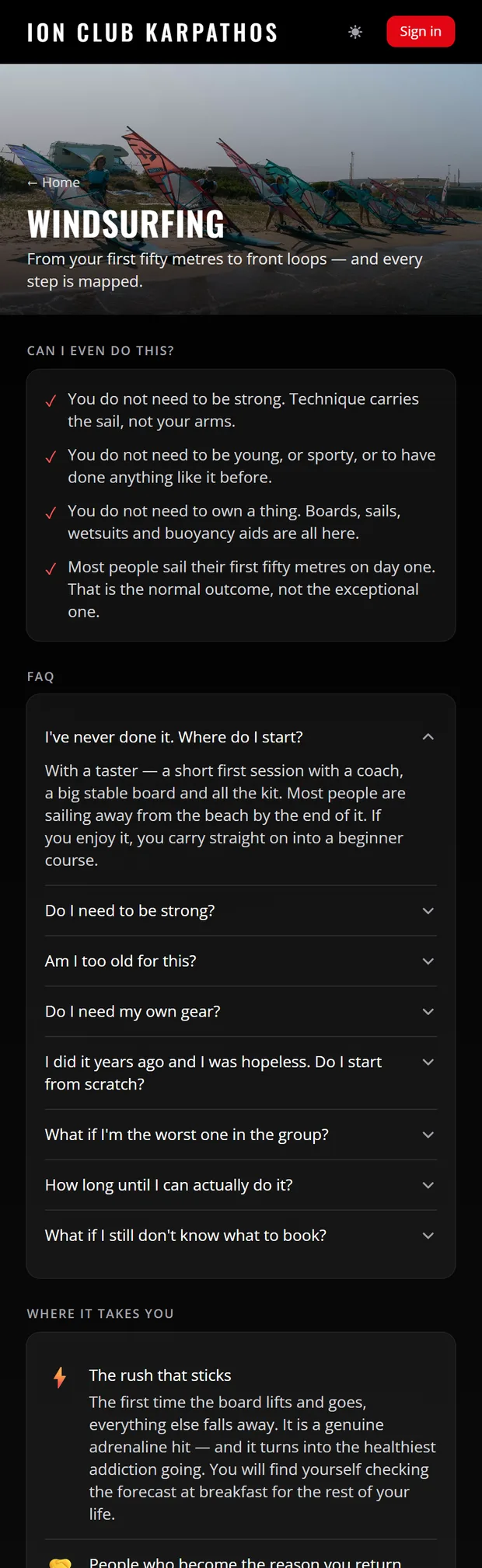
The windsurfing progression page in the guest app
The sport explained end to end, so a hesitant guest can see where they would start and what comes after.
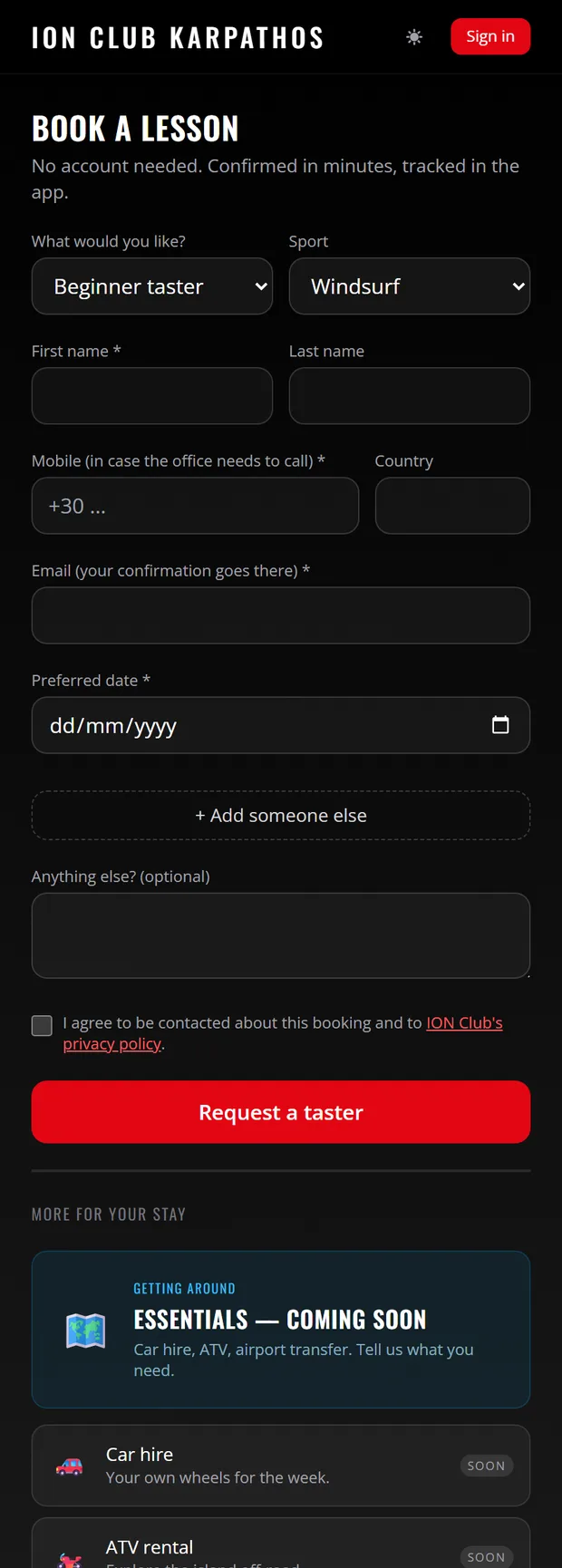
Booking a taster lesson in the guest app without an account
A taster, a kids’ lesson or a private booked without creating an account — landing on the centre’s calendar as a request the desk confirms.

Their own diary

Live today

Water time and lessons merge into one timeline the guest adds to — stars, the rig they sailed, and private notes only they can read. Shipped August 2026.

Registration and booking

Live today

Guests register on their own phone from a QR code, so the desk never types their details. A taster or private lesson is booked without creating an account.

Hours, counted live

Live today

During a stay the app shows prepaid lesson hours as a running balance — four of six used — read from the same package record the desk works in, and updated the moment a lesson is attended. Rental hours the same way, per package.

Designed and not yet shipped: allocation confirmations and schedule-change notices by app and email, so the desk stops relaying messages and the guest always holds the current plan.

Why it compounds

Progressive sports reward the centre that keeps the record

Windsurfing and wingfoiling are learned in steps, over years, usually at more than one centre. The centre that can show a guest exactly where they are and what comes next is the one they come back to — and the one whose next sale is a welcome suggestion rather than a pitch.

  1. 01

    The record is created where the sport happens

    The instructor closes the lesson on the beach in seconds: attended, how it went, which manoeuvres are now verified. That is the only moment the truth exists, and it is captured by the person who was there.

  2. 02

    A level means the same thing every time

    Levels are awarded against the centre’s own skill catalogue, at the level the lesson was planned for. What the centre intends to teach and what it certifies are defined once — not judged differently by each coach, each season.

  3. 03

    Recognition makes the next sale obvious

    A guest who has just reached a level has one natural next step: the next course, a technique clinic, or a first wingfoil session for a progressing windsurfer. The desk sees the shortlist of guests ready to progress, and the guest sees it in their own app. The crossover is a priced product rather than a favour — a guest moving between windsurf and wing buys one Multisport package: one price, one bill line, both sports covered for the window.

  4. 04

    The guest owns the story, so they come back to continue it

    Sessions, hours on the water, lessons and levels sit in the guest’s own app as a diary they add to. Progressive sports reward return visits — and a guest who can see how far they have come has a reason to book the next week rather than a different bay.

  5. 05

    The centre can market to what it actually knows

    A season ends with one clean guest list segmented by sport, level and what each guest is ready for next — not a spreadsheet of email addresses. The same records measure the product itself: which lesson types fill, which levels stall, and which instructors move guests up the ladder.

  6. 06

    The relationship is owned, not rented

    A booking platform carries no stable customer identity, so the centre’s own system keeps one — matching on email, then phone, then name with full date of birth and country, then progressively more specific fallbacks. A contact detail shared by several people is never treated as an identity, and anything inconclusive goes to a review queue rather than fusing two guests into one record. The guest list improves every season instead of degrading, and every booking that comes direct next season is commission the centre keeps.

The loop, in one screen

Thirty seconds on the beach is what the whole journey is built on

The instructor grades the manoeuvres that were actually taught, and a level is awarded with a celebration the guest sees on the sand. That single action moves the guest’s profile, tells the desk who is ready for more, and fills the guest’s own record in their app.

It is deliberately the shortest screen in the product. Anything longer does not get done with the next group waiting — and then the record never forms.

Awarding a level at the end of a lesson in TeamOps
Skills verified against the centre’s own ladder, then Level up.

Built for teaching centres

For any centre that rents kit, teaches to a syllabus and puts people in the water

A teaching centre has obligations a rental shack does not: a certified progression to grade against, qualified staff to roster, safety routines to evidence, and a guest list in five languages. Those are the parts of the operation SurfOps was built around first — which is why the same system fits a windsurf school, a kite centre, a surf camp and a dive centre, whether the ladder it teaches is RYA, VDWS, IKO, PADI or the centre’s own.

  • Windsurf
  • Wingfoil
  • Kitesurf
  • Surf
  • Dive

Running today at a windsurf and wingfoil centre. The parts that differ between sports — the equipment catalogue, the lesson products, the level ladder and its manoeuvres — are per-centre data, so a dive or kite operation is configured rather than rebuilt.

Your syllabus, entered — not rebuilt

The manoeuvres or skills that define each level are per-centre data. An RYA, VDWS, IKO or PADI progression, or a centre’s own ladder, is configuration rather than a development project.

Evidence for inspection and insurance

Safety routines are ticked off on the daily ops board by the person who did them, with missed and late jobs visible and a named end-of-day sign-off. The completion record is a by-product of running the day, not separate paperwork.

Qualifications enforced where it matters

The lesson picker only offers instructors certified for that sport and level, and double-booking is prevented in the interface and again in the database — for every application.

An international team and an international guest list

Lessons match guests to instructors by language, and each centre’s seasons, prices, caps and date format are its own configuration.

Nothing to run

Managed cloud with point-in-time recovery. No server in the office, no version to upgrade at the start of the season, no on-site installation visit.

One record, every touchpoint

Transfers, activities and the restaurant read the same guest list as the watersports operation, so the season picture is complete without reconciling side systems.

Underneath all of it, the system audits its own records continuously — charges raised for a guest whose stay was never opened, guests who departed with an open balance, boards still to assign, duplicate guests, stays without an end date — and presents each as a worklist with the resolution one click away, so the data a centre certifies against stays clean through the season.
Who builds it

Syndeo — builders with operational expertise

SurfOps is made by Syndeo, a product and delivery consultancy. The difference you can feel in the product is not a feature list: it is that the people who built it spent a season inside a working centre, and that changing it afterwards is cheap.

We build software for a living

Syndeo is a product and delivery consultancy. SurfOps is our own product, built to the same standard as the platform work we do for clients — specified, reviewed, tested and released against real operations rather than a wishlist.

We learned the operation before we wrote it

Every screen in SurfOps was designed alongside the people who use it — the front desk, the beach team, the centre manager — through a full live season. It is not a generic booking tool with watersports labels on it.

AI-native delivery, human-gated

Implementation, tests and the response to failures run as an agent workflow, while design, test and release stay gates a person reviews and signs off. That is why a request from the front desk is live in days rather than quoted as a change order for next season.

The centre’s own staff steer it

Improvements are raised from inside the app, on the screen where the idea occurred, and land directly in the delivery backlog. The operation shapes the product continuously.

The cost of changing the software stops being the reason a centre cannot change how it works.

There is no implementation project to buy, no server to install, and no annual maintenance contract holding the operation still. A centre gets the delivery team’s attention on its own operation, not a ticket in a queue behind a thousand other customers.

More about how Syndeo works — syndeo.cz.

Where this goes next

In design

Agents that watch the operation

The same approach that builds the product is the direction the product itself is heading: intelligence sitting on top of a complete, live record of the centre — finding the improvements to service delivery a busy team has no hours to look for, and adding operational capacity that could not realistically be taken on any other way.

Watching the operation, not reporting on it

Unsold seats for the week ahead, guests who are ready to progress and leaving on Saturday, kit that is never issued, safety jobs slipping, a bill that will walk out of the door — surfaced as work with the resolution attached, rather than a dashboard someone has to remember to read.

Questions in plain language

Ask the season’s own data a question and get an answer, with personal data masked and every decision left with a person.

Capacity a centre could not otherwise staff

The analysis, follow-up and continuous tidying that a centre knows it should do and never has the hours for — done continuously, and improving service delivery rather than adding headcount.

This is the designed direction, not a shipped feature. The foundation it needs is already in place: one database across all four applications, an append-only audit trail, and a registry of data-integrity checks the system runs against its own records.

Talk to us

See it running on a real season

The quickest way to judge SurfOps is a walkthrough of a live centre’s operating day — arrivals, the fleet, the water, the bill — and then the same walk through your own.

What a centre gets

  • One guest record from first booking to settled departure.
  • Four applications on one database — desk, beach, guest and marketplace.
  • Each centre’s seasons, prices, caps and syllabus are configuration, not code.
  • Managed cloud with point-in-time recovery — nothing to run on site.
  • Developed hands-on with a working centre through a live season.